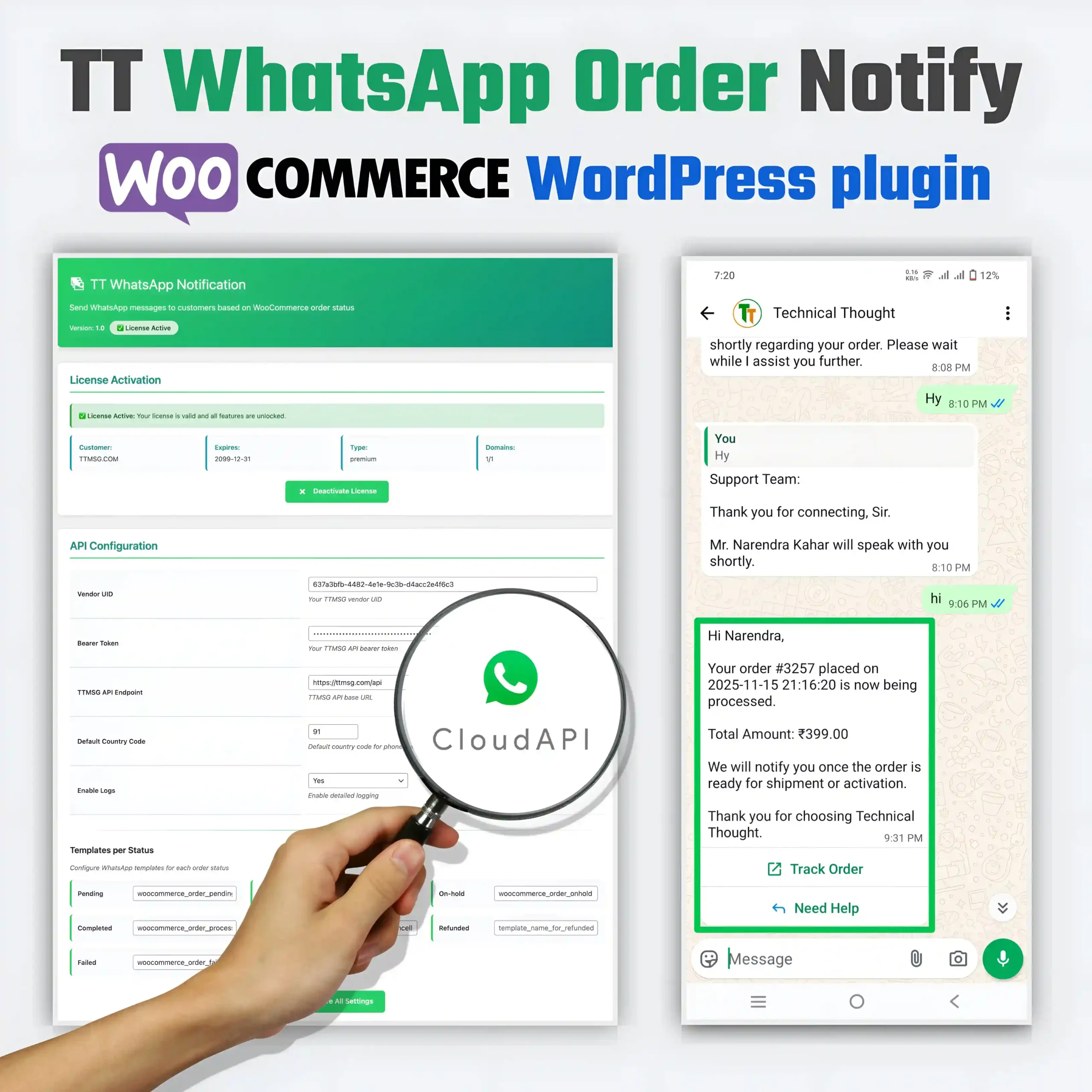
TT WhatsApp Order Notify – TTMSG WooCommerce WordPress plugin
TT WhatsApp Order Notify is a powerful WordPress plugin that connects your WooCommerce store to the TTMSG WhatsApp API. This plugin automatically sends WhatsApp messages to customers when the order status changes. And this plugin will take your customer communication to the next level. Single User License Features – 799/year and Multi User License Features – 2999/year.
Description
TT WhatsApp Order Notify is a professionally developed WordPress plugin developed by Technical Thought team. This plugin is specifically designed for WooCommerce store owners who want to send automated WhatsApp notifications to their customers.
Main Features
- Automatic WhatsApp notifications on order status change
- License-based activation system
- TTMSG API integration
- Customizable templates for each order status
- Detailed activity logging
- Manual test sending capability
- Secure API authentication
- Multi-language support
- Mobile responsive admin interface
Plugin installation and activation
System Requirements
- WordPress 5.6 or higher
- WooCommerce 4.0 or higher
- PHP 7.2 or higher
- SSL certificate (recommended)
- TTMSG account with valid API credentials
Installation Steps
- go to wordpress admin panel
- Plugins → Add New → Upload Plugin
- select zip file
- Click Install Now
- Click on Activate Plugin button
- TT WhatsApp menu will appear in the admin sidebar.
License Activation System
License activation is mandatory to use the plugin. The licensing system provides multiple benefits.
License Activation Process
- purchase license key from TTMSG
- License key format: TTMSG-XXXX-XXXX-XXXX-XXXX
- Go to License Activation section in Admin panel.
- enter license key
- Click “Activate License” button
License types and pricing
- Single User License: ₹799/year
- 1 website use
- Basic support
- Standard updates
- Multi-Domain License: ₹2,999/year
- Unlimited websites
- Priority support
- Standard updates
- White-label option available
API Configuration Section
1. Vendor UID
- Unique identifier in the TTMSG system
- Format: UUID format (e.g., 637a3bfb-4482-4e1e-9c3b-d4acc2e4f6c3)
- Obtained from the TTMSG dashboard
- Each vendor has a unique UID
2. Bearer Token
- Security token for API authentication
- Hidden display for security
- Generated from the TTMSG.COM account
- The token needs to be renewed after it expires
3. TTMSG API Endpoint
- Default: https://ttmsg.com/api
- You can also set a custom endpoint.
- All API requests go to this URL.
- SSL encrypted connection
4. Default Country Code
- Default: 91 (India)
- For phone number formatting
- Can be changed for international stores
- Format: Digits only (no plus sign)
5. Enable Logs
- For detailed logging
- Helpful for debugging
- Logs are stored in the WordPress database
- A maximum of 100 log entries are maintained
Template System Configuration
The plugin allows you to set a different WhatsApp template for each WooCommerce order status.
- Pending – Order placed but payment pending
- Processing – Payment received, order processing
- On-hold – Order temporarily on hold
- Completed – Order successfully delivered
- Cancelled – Order cancelled
- Refunded – Payment refunded
- Failed – Payment failed
Template Mapping:
$templates = array(
    'pending'    => 'template_name_for_pending',
    'processing' => 'woocommerce_order_processing',
    'on-hold'    => 'woocommerce_order_onhold',
    'completed'  => 'woocommerce_order_completed',
    'cancelled'  => 'woocommerce_order_cancelled',
    'refunded'   => 'template_name_for_refunded',
    'failed'     => 'woocommerce_order_failed',
);
Template Creation Process
Step 1: TTMSG Account Setup
- Register on TTmsg.com
- Complete email verification
- Fill in your profile details
- Connect Your Whatsapp Meta api
Step 2: WhatsApp Business Account Approval
- submit business details
- complete document verification
- Wait for WhatsApp Business Account approval
- get API access
Step 3: Template Creation
- Go to the Templates section in the TTMSG.COM dashboard.
- Click on Create New Template.
- Fill in the template details:
Template Format Example:
Template Name: order_confirmation
Category: TRANSACTIONAL/UTILITY
Language: English

Header: (Optional)
Type: Text / Image / Document
Content: Your Order Confirmation

Body:
Hello {{1}},
Your order {{2}} has been confirmed!
Amount: {{3}}
Date: {{4}}

Footer: (Optional)
Thank you for shopping with us!

Buttons: (Optional)
- View Order: https://yourstore.com/order/{{2}}
- Contact Support: https://yourstore.com/contact
Template Variables/Placeholders
{{1}}– Customer name{{2}}– Order ID{{3}}– Order total{{4}}– Order date
Step 4: Template Submission aur Approval
- Submit the template for review.
- The WhatsApp team will review it (24-48 hours).
- The template will become active after approval.
- Note down the name of the active template.
Cases and practical applications for it
1. E-commerce Stores:
- Order confirmation messages
- Shipping updates
- Delivery notifications
- Payment reminders
- Review requests
- Abandoned cart recovery
2. Service Businesses:
- Appointment confirmations
- Service reminders
- Completion notifications
- Follow-up messages
- Feedback requests
3. Digital Products:
- Download links
- Access credentials
- License keys
- Update notifications
- Renewal reminders
4. Subscription Services:
- Subscription confirmations
- Renewal reminders
- Payment receipts
- Upgrade offers
- Cancellation confirmations
Troubleshooting and Common Issues
1. License Activation Failed:
- Check internet connection
- Verify license key
- Check domain whitelisting
- Contact Technical Thought support
2. Messages Not Sending:
- Verify API credentials
- Check template approval status
- Validate phone number format
- Check API rate limits
- Review activity logs
3. Template Not Found:
- Verify template name spelling
- Check template approval status
- Confirm template category
- Contact TTMSG support
4. API Connection Issues:
- Check server firewall settings
- Verify SSL certificate
- Test API endpoint connectivity
- Check PHP cURL extension
Advanced Customization
add_action('tt_whatsapp_before_send', function($order_id, $template_name) {
    // Custom logic before sending
}, 10, 2);

add_action('tt_whatsapp_after_send', function($order_id, $response) {
    // Custom logic after sending
}, 10, 2);
add_filter('tt_whatsapp_template_vars', function($vars, $order_id) {
    $order = wc_get_order($order_id);
    $vars['field_5'] = $order->get_shipping_method();
    $vars['field_6'] = get_post_meta($order_id, '_tracking_number', true);
    return $vars;
}, 10, 2);
add_filter('tt_whatsapp_should_send', function($should_send, $order_id, $status) {
    $order = wc_get_order($order_id);
    $total = $order->get_total();

    if ($total < 500) {
        return false;
    }

    return $should_send;
}, 10, 3);
SEO and Marketing Benefits
1. Customer Engagement:
- WhatsApp open rates: 98% (vs email 20%)
- Response rates: 40-50% (vs SMS 5-10%)
- Customer satisfaction increase
- Brand loyalty improvement
2. Business Growth:
- Repeat purchases increase
- Customer retention improvement
- Word-of-mouth marketing
- Competitive advantage
3. Cost Efficiency:
- WhatsApp message cost: ₹ 0.11 - 0.12
- DLT SMS cost: ₹0.50 - 1.00
- Email marketing cost: Variable
- Higher ROI on marketing spend
Compliance aur Legal Considerations
1. WhatsApp Business Policy:
- Transactional messages only
- No promotional content in transactional templates
- Customer consent required
- Opt-out mechanism mandatory
2. Data Privacy:
- GDPR compliance (EU customers)
- PDPA compliance (India)
- Customer data protection
- Secure data storage
3. Spam Regulations:
- No unsolicited messages
- Business hours only
- Frequency limits
- Content restrictions
Future Updates and Roadmap
Planned Features:
- Bulk message sending
- Advanced template editor
- Analytics dashboard
- Multi-language templates
- Integration with other CRMs
- Advanced segmentation
- Automated campaigns
- A/B testing
Update Mechanism:
- Automatic update checks
- License validation before updates
- Changelog display
- Rollback option
- Update notifications
Support aur Documentation
Support Channels:
- Email support: support@technicalthought.com
- Documentation: https://technicalthought.com/docs
- Video tutorials: YouTube channel
- Priority support for multi-domain licenses
Documentation Resources:
- Installation guide
- Configuration manual
- Template creation guide
- API documentation
- Troubleshooting guide
- Video tutorials
Conclusion
TT WhatsApp Order Notify is a comprehensive solution for WooCommerce store owners who want to automate their WhatsApp business communication. This plugin provides easy setup, robust features, and reliable performance.
Final Recommendation
If you are a serious e-commerce business owner and want to improve customer communication, then the TT WhatsApp Order Notify plugin is the perfect investment for you. Start with a single license and upgrade to a multi-domain license as your business grows.
Additional information
| License Type | Single User, Multi User 1. Single User License Features – 799/year • 1 Website Use 2. Multi User License Features – 2999/year • Unlimited Websites |
|---|
Only logged in customers who have purchased this product may leave a review.
- Support Policy: All technical support is paid. No free support is provided.
- Technical Support Email : Support@TechnicalThought.com
- WhatsApp Support: +91 9755542018 (Click to chat directly on WhatsApp)
- Response Time: We respond within 24 hours to ensure timely support.


Reviews
There are no reviews yet.